Interpreting a leaf identification model with LIME
This notebook demonstrates the use of DIANNA with the LIME method on the leafsnap30 image dataset. A pre-trained neural network classifier is used, which identifies the species of leaf based on an image of it.
LIME (Local Interpretable Model-agnostic Explanations) is an explainable-AI method that aims to create an interpretable model that locally represents the classifier. For more details see the LIME paper.
NOTE: This tutorial is still work-in-progress, the final results need to be improved by tweaking the LIME parameters
Colab Setup
[1]:
running_in_colab = 'google.colab' in str(get_ipython())
if running_in_colab:
    # install dianna
    !python3 -m pip install dianna[notebooks]
0 - Imports and paths
[2]:
from PIL import Image
import matplotlib.pyplot as plt
import numpy as np

import dianna
from dianna import visualization
from dianna.utils.downloader import download
[3]:
true_species = 'acer_rubrum'
image_path = download(f'leafsnap_example_{true_species}.jpg', 'data')
model_path = download('leafsnap_model.onnx', 'model')
model_classes_path = download('leafsnap_classes.csv', 'label')
1 - Loading the data
Two files are loaded here:
A file containg the numerical index that belongs to each class (=species of leaf). This is used so we know which output of the neural network corresponds to the class we want to run LIME on.
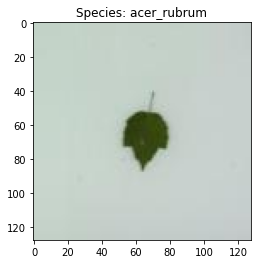
An image of a leaf, belonging to the Acer Rubrum species.
DIANNA requires input in numpy format, so the .jpg image is loaded and converted into a numpy array. The pixel values are then converted to the 0-1 range, which the classifier requires. Finally, DIANNA requires the presence of a batch axis, and it needs to know where the batch and colour channel axes are located in the input data.
[4]:
# load the model class definitions
class_to_idx = dict(np.genfromtxt(model_classes_path, dtype=None, encoding=None, delimiter=','))
true_species = 'acer_rubrum'
true_species_index = class_to_idx[true_species]
[5]:
# load and plot the example image
img = np.array(Image.open(image_path))

plt.imshow(img)
plt.title(f'Species: {true_species}');

# the model expects float32 values in the 0-1 range for each pixel, with the colour channels as first axis
# the .jpg file has 0-255 ints with the channel axis last so it needs to be changed
input_data = img.transpose(2, 0, 1).astype(np.float32) / 255.

# define axis labels. Required is the channels axis
# in this example image, the channels axis is the first axis
axis_labels = {0: 'channels'}
2 - Applying LIME with DIANNA
The simplest way to run DIANNA on image data is with dianna.explain_image. The arguments are:
The path to the model in ONNX format
The image we want to explain
The name of the explainable-AI method we want to use, here LIME
The location of the batch and colour channel axes in the data
The numerical indices of the classes we want an explanation for
[6]:
# An explanation is returned for each label, but we ask for just one label so the output is a list of length one.
explanation_heatmap = dianna.explain_image(model_path, input_data, 'LIME', axis_labels=axis_labels, labels=[true_species_index])[0]
3 - Visualization
[7]:
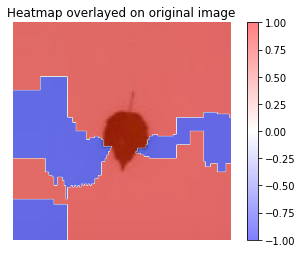
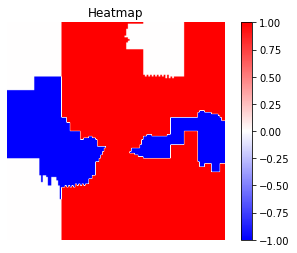
visualization.plot_image(explanation_heatmap)
plt.title('Heatmap')
plt.axis('off')

visualization.plot_image(explanation_heatmap, original_data=img)
plt.title('Heatmap overlayed on original image')
plt.axis('off')

plt.show()

dianna.explain_image and will automatically be used by LIME.Increase the number of features from the default 10 to 30
Change the colour of superpixels that are turned “off” by LIME to white (Default = average of surrounding superpixels)
[8]:
explanation_heatmap_customized = dianna.explain_image(model_path, input_data, 'LIME', axis_labels=axis_labels, labels=[true_species_index],
                                                    num_features=30, num_samples=1000)[0]
[9]:
visualization.plot_image(explanation_heatmap_customized)
plt.title('Heatmap')
plt.axis('off')

visualization.plot_image(explanation_heatmap_customized, original_data=img)
plt.title('Heatmap overlayed on original image')
plt.axis('off')

plt.show()